Showing posts with label consumerfed. Show all posts

June 21, 2020

Budget Preparation monthly estimation of budget java source code cfed

import java.io.IOException;

import javax.swing.JOptionPane;

/**
 * 
 */

/**
 * @author vipin
 *
 */
public class MainClass {

/**
* @param args
*/
public static void main(String[] args) {
    ReadExcel test = new ReadExcel();
   test.setInputFile("BUDGET.xls");
  // test.setInputFile("BUDGET.xls");
    try {
test.read();
} catch (IOException e) {
// TODO Auto-generated catch block
e.printStackTrace();
JOptionPane.showMessageDialog(null, "Err"+e.getMessage());
}

}

}


import java.io.File;
import java.io.IOException;

import java.util.HashMap;
import java.util.Map;
import java.util.Vector;

import javax.swing.JOptionPane;

import jxl.Cell;
import jxl.CellType;
import jxl.Sheet;
import jxl.Workbook;
import jxl.read.biff.BiffException;
import jxl.write.WriteException;
/**
 * 
 * @author cfed
 *
 */
public class ReadExcel {

  private String inputFile = null;
  private BudgetCreator budgetCreator = null;
  
  //private Vector<Vector> array =null;
  
  private Map<Integer,Double> lastFinYrRetail = null;
  private Map<Integer,Double> lastFinYrSbdy = null;
  private Map<Integer,Double> newFinYrRetail = null;
  private Map<Integer,Double> newFinYrSbdy = null;
  private Map<Integer,Double> budgetData = null;
  
  private int lstYrsRFirmCode = 0;
  private double lstYrsRValue = 0;
 
  private int lstYrsSFirmCode = 0;
  private double lstYrsSValue = 0;

  
  private int newYrsRFirmCode = 0;
  private double newYrsRValue = 0;

  private int newYrsSFirmCode = 0;
  private double newYrsSValue = 0;

  
  private int budgetFirmCode = 0;
  private double budgetValue = 0;


  public void setInputFile(String inputFile) {
    this.inputFile = inputFile;
  }

  public void read() throws IOException  {
  budgetCreator = new BudgetCreator();
// array = new Vector<Vector>();
  lastFinYrRetail = new HashMap<Integer, Double>();
  lastFinYrSbdy= new HashMap<Integer, Double>();
  newFinYrRetail = new HashMap<Integer, Double>();
  newFinYrSbdy= new HashMap<Integer, Double>();
  budgetData= new HashMap<Integer, Double>();
    File inputWorkbook = new File(inputFile);
    Workbook w;
    try {
      w = Workbook.getWorkbook(inputWorkbook);

      Sheet sheet = w.getSheet("Sheet1");

      
     int rowCount = sheet.getRows();
     int colCount = 10;
      
      for(int row=0; row<rowCount; row++){
      
      for(int col=0;col<colCount;col++){
      
      Cell cell = sheet.getCell(col, row);
      CellType type = cell.getType();
      String value = cell.getContents();
      switch (col) {
case 0:
lstYrsRFirmCode = budgetCreator.getNameFirmCode(value);
break;
case 1:
if(lstYrsRFirmCode>0&&(type==CellType.NUMBER)){
lstYrsRValue = Double.parseDouble(value);
    lastFinYrRetail.put(lstYrsRFirmCode, lstYrsRValue/100000);  // first retails input
}
break;
case 2:
lstYrsSFirmCode = budgetCreator.getNameFirmCode(value);
break;
case 3:
if(lstYrsSFirmCode>0&&(type==CellType.NUMBER)){
lstYrsSValue = Double.parseDouble(value);
    lastFinYrSbdy.put(lstYrsSFirmCode, lstYrsSValue/100000); // first sbdy input
}
break;
case 4:
newYrsRFirmCode = budgetCreator.getNameFirmCode(value);
break;
case 5:
if(newYrsRFirmCode>0&&(type==CellType.NUMBER)){
newYrsRValue = Double.parseDouble(value);
    newFinYrRetail.put(newYrsRFirmCode, newYrsRValue/100000); // new retail input
}
break;
case 6:
newYrsSFirmCode = budgetCreator.getNameFirmCode(value);
break;
case 7:
if(newYrsSFirmCode>0&&(type==CellType.NUMBER)){
newYrsSValue = Double.parseDouble(value);
    newFinYrSbdy.put(newYrsSFirmCode, newYrsSValue/100000); // new sbdy input
}
break;
case 8:
budgetFirmCode = budgetCreator.getNameFirmCode(value);
break;
case 9:
if((budgetFirmCode>0)&&(type==CellType.NUMBER)){  //add recently
budgetValue = Double.parseDouble(value);
    budgetData.put(budgetFirmCode, budgetValue); // budget value
}
break;

default:
break;
}
      
    }
   
      
      }

      
      Vector<Vector> array =budgetCreator.calculateBudget(lastFinYrRetail,lastFinYrSbdy,newFinYrRetail,newFinYrSbdy,budgetData);
      WriteExcel test = new WriteExcel();
         test.setOutputFile("BUDGET_REPORT.xls",array);
    //test.setOutputFile("BUDGET_REPORT.xls",array);
          test.write();
          JOptionPane.showMessageDialog(null, "Excel file : BUDGET_REPORT created !!! ");
          
    } catch (BiffException e) {
      e.printStackTrace();
      JOptionPane.showMessageDialog(null, "Err"+e.getMessage());
    } catch (WriteException e) {
// TODO Auto-generated catch block
e.printStackTrace();
JOptionPane.showMessageDialog(null, "Err"+e.getMessage());
}catch (Exception e) {
// TODO Auto-generated catch block
e.printStackTrace();
JOptionPane.showMessageDialog(null, "Err"+e.getMessage());
}
  }


import java.util.HashMap;
import java.util.Map;


public class UnitsMap {
private Map<Integer,String> unitMap = null;
public UnitsMap(){
unitMap = new HashMap<Integer, String>();
//unitMap.put(287, "GROCERY SECTION MUTHALAKULM( 0287)");
}

public Map<Integer, String> getUnitMap() {
unitMap.put(287,"GROCERY SECTION MUTHALAKULM( 0287)");
unitMap.put(2002,"LITTLE TRIVENI  STORE  KOODARANJI( 2002)");
unitMap.put(2003,"LITTLE TRIVENI STORE KODANCHERY( 2003)");
unitMap.put(2750,"LITTLE TRIVENI STORE KOODATHAI( 2750)");
unitMap.put(2001,"LITTLE TRIVENI STORE KOOLIMADU( 2001)");
unitMap.put(2649,"LITTLE TRIVENI STORE PANAMARAM( 2649)");
unitMap.put(2650,"LITTLE TRIVENI STORE VAALAD( 2650)");
unitMap.put(304,"LITTLE TRIVENI SUPER STORE  K P K( 0304)");
unitMap.put(327,"LITTLE TRIVENI SUPER STORE CHERUVAD( 0327)");
unitMap.put(2538,"LITTLE TRIVENI SUPER STORE KARASSERY( 2538)");
unitMap.put(410,"LITTLE TRIVENI SUPER STORE KODUVALL( 0410)");
unitMap.put(2514,"LITTLE TRIVENI SUPER STORE MANASSERY( 2514)");
unitMap.put(619,"MINI TRIVENI STORE KULAGARA( 0619)");
unitMap.put(2648,"MINI TRIVENI STORE PANNIMUKKU( 2648)");
unitMap.put(2540,"MOBILE TRIVENI BALUSSERY( 2540)");
unitMap.put(2541,"MOBILE TRIVENI BEYPORE( 2541)");
unitMap.put(2507,"MOBILE TRIVENI CALICUT NORTH( 2507)");
unitMap.put(1893,"MOBILE TRIVENI CALICUT SOUTH( 1893)");
unitMap.put(2505,"MOBILE TRIVENI KALPETTA( 2505)");
unitMap.put(2544,"MOBILE TRIVENI KODUVALLI( 2544)");
unitMap.put(2635,"MOBILE TRIVENI KOYILANDY( 2635)");
unitMap.put(2543,"MOBILE TRIVENI KUNNAMANGALAM( 2543)");
unitMap.put(2633,"MOBILE TRIVENI KUTTIADY( 2633)");
unitMap.put(1895,"MOBILE TRIVENI MANANTHAVADY( 1895)");
unitMap.put(2542,"MOBILE TRIVENI NADAPURAM( 2542)");
unitMap.put(2632,"MOBILE TRIVENI PERAMBRA( 2632)");
unitMap.put(1892,"MOBILE TRIVENI STORE ELATHOOR( 1892)");
unitMap.put(1894,"MOBILE TRIVENI SULTHANBATHERI( 1894)");
unitMap.put(2508,"MOBILE TRIVENI THIRUVAMPADI( 2508)");
unitMap.put(2634,"MOBILE TRIVENI VATAKARA( 2634)");
unitMap.put(257,"TRIVENI DEPARTMENT COSMETICS MUTHAL( 0257)");
unitMap.put(259,"TRIVENI GIFT LAND MUTHALAKULAM( 0259)");
unitMap.put(340,"TRIVENI GODOWN  VATAKARA( 0340)");
unitMap.put(33,"TRIVENI GODOWN GROCERY( 0033)");
unitMap.put(261,"TRIVENI SUPER MARKET  VATAKARA( 0261)");
unitMap.put(430,"TRIVENI SUPER MARKET BALUSSERY( 0430)");
unitMap.put(2977,"TRIVENI SUPER MARKET EASTHILL( 2977)");
unitMap.put(325,"TRIVENI SUPER MARKET FEROKE( 0325)");
unitMap.put(2804,"TRIVENI SUPER MARKET KADIYANGAD( 2804)");
unitMap.put(422,"TRIVENI SUPER MARKET KAKKATTIL( 0422)");
unitMap.put(431,"TRIVENI SUPER MARKET KALPATTA( 0431)");
unitMap.put(260,"TRIVENI SUPER MARKET KOYILAN( 0260)");
unitMap.put(450,"TRIVENI SUPER MARKET KUNNAMANGALAM( 0450)");
unitMap.put(266,"TRIVENI SUPER MARKET MANANTHAVADY( 0266)");
unitMap.put(414,"TRIVENI SUPER MARKET MEENANGADY( 0414)");
unitMap.put(258,"TRIVENI SUPER MARKET NADAKKAVU( 0258)");
unitMap.put(432,"TRIVENI SUPER MARKET NADAPURAM( 0432)");
unitMap.put(379,"TRIVENI SUPER MARKET PAROPADI( 0379)");
unitMap.put(328,"TRIVENI SUPER MARKET PERAMBRA( 0328)");
unitMap.put(263,"TRIVENI SUPER MARKET THAMARASSERY( 0263)");
unitMap.put(3001,"TRIVENI GODOWN KARASSERY(3001)");
return unitMap;
}

public void setUnitMap(Map<Integer, String> unitMap) {
this.unitMap = unitMap;
}
}


import java.io.File;
import java.io.IOException;
import java.util.Locale;
import java.util.Vector;

import jxl.CellView;
import jxl.Workbook;
import jxl.WorkbookSettings;
import jxl.format.UnderlineStyle;
import jxl.write.Formula;
import jxl.write.Label;
import jxl.write.Number;
import jxl.write.WritableCellFormat;
import jxl.write.WritableFont;
import jxl.write.WritableSheet;
import jxl.write.WritableWorkbook;
import jxl.write.WriteException;
import jxl.write.biff.RowsExceededException;


public class WriteExcel {

  private WritableCellFormat timesBoldUnderline;
  private WritableCellFormat times;
  private String inputFile;
  private Vector<Vector> array = null;


  public void setOutputFile(String inputFile) {
  this.inputFile = inputFile;
  }

  public void setOutputFile(String inputFile, Vector<Vector> array) {
  this.inputFile = inputFile;
  this.array = array;
}
  
  public void write() throws IOException, WriteException {
    File file = new File(inputFile);
    WorkbookSettings wbSettings = new WorkbookSettings();

    wbSettings.setLocale(new Locale("en", "EN"));

    WritableWorkbook workbook = Workbook.createWorkbook(file, wbSettings);
    workbook.createSheet("Report", 0);
    WritableSheet excelSheet = workbook.getSheet("Report");
    createLabel(excelSheet);
    createContent(excelSheet);

    workbook.write();
    workbook.close();
  }

  private void createLabel(WritableSheet sheet)
      throws WriteException {
    // Lets create a times font
    WritableFont times10pt = new WritableFont(WritableFont.TIMES, 10);
    // Define the cell format
    times = new WritableCellFormat(times10pt);
    // Lets automatically wrap the cells
    times.setWrap(true);

    // Create create a bold font with unterlines
    WritableFont times10ptBoldUnderline = new WritableFont(WritableFont.TIMES, 10, WritableFont.BOLD, false,
        UnderlineStyle.SINGLE);
    timesBoldUnderline = new WritableCellFormat(times10ptBoldUnderline);
    // Lets automatically wrap the cells
    timesBoldUnderline.setWrap(true);

    CellView cv = new CellView();
    cv.setFormat(times);
    cv.setFormat(timesBoldUnderline);
    cv.setAutosize(false);

    // Write a few headers
    addCaption(sheet, 0, 0, "SL No");
    addCaption(sheet, 1, 0, "Branch Name");
    addCaption(sheet, 2, 0, "Retail");
    addCaption(sheet, 3, 0, "Sbdy");
    addCaption(sheet, 4, 0, "Retail");
    addCaption(sheet, 5, 0, "Sbdy");
    addCaption(sheet, 6, 0, "Variation");
    addCaption(sheet, 7, 0, "Budget");
    addCaption(sheet, 8, 0, "Comparison");
    

  }

  private void createContent(WritableSheet sheet) throws WriteException,
      RowsExceededException {
  
  int size = array.size();
  sheet.setColumnView(1, 50);
      for(int row = 0; row < size; row ++){
  sheet.setRowView(row, 400);
  Vector val = array.get(row);
  for(int col =0; col<9;col++){
  addValues(sheet,col, row, val.get(col));
  }
}


  }

  private void addCaption(WritableSheet sheet, int column, int row, String s)
      throws RowsExceededException, WriteException {
    Label label;
    label = new Label(column, row, s, timesBoldUnderline);
    sheet.addCell(label);
  }

  private void addNumber(WritableSheet sheet, int column, int row,
      Integer integer ) throws WriteException, RowsExceededException {
 
    Number number;
    number = new Number(column, row, integer, times);
    sheet.addCell(number);
    
  }
  
  private void addValues(WritableSheet sheet, int column, int row, Object obj)
      throws WriteException, RowsExceededException {
    Label label;
    label = new Label(column, row, obj.toString(), times);
    sheet.addCell(label);
  }

  private void addLabel(WritableSheet sheet, int column, int row, String s)
      throws WriteException, RowsExceededException {
    Label label;
    label = new Label(column, row, s, times);
    sheet.addCell(label);
  }


/**
 * Budget Creator
 */
import java.text.DecimalFormat;
import java.util.Map;
import java.util.Vector;

/**
 * Consumerfed kozhikode region
 */

/**
 * @author shimjith
 *
 */
public class BudgetCreator {
private UnitsMap unitMap = null;
private Vector<Vector> array = null; //output array
DecimalFormat decimalFormat = null;
public BudgetCreator(){
}

public int getNameFirmCode(String value) {
int firmCode = 0;
String str = value;
if(str.contains("(")&& str.contains(")")){
int startIndex = str.indexOf("(");
int endIndex = str.indexOf(")");
//System.out.println(true);
//System.out.println(startIndex + "--" +endIndex);
String sub = str.substring(startIndex+1, endIndex).trim();
sub = sub.trim();
//System.out.println(sub);
firmCode = Integer.parseInt(sub);
//System.out.println(" firmcode :"+firmCode);
}
return firmCode;
}


public void viewData(Map<Integer, Double> budgetData) {
// TODO Auto-generated method stub
System.out.println(" ------- Report -----------");
System.out.println(budgetData.size());
System.out.println(budgetData);
}

public Vector<Vector> calculateBudget(Map<Integer, Double> lastFinYrRetail,
Map<Integer, Double> lastFinYrSbdy,
Map<Integer, Double> newFinYrRetail,
Map<Integer, Double> newFinYrSbdy, Map<Integer, Double> budgetData) {
// TODO Auto-generated method stub
unitMap = new UnitsMap();
array = new Vector<Vector>();
Vector heading = new Vector();
heading.add("SLNO");
heading.add("BRANCH NAME");
heading.add("RETAIL");
heading.add("SBDY");
heading.add("RETAIL");
heading.add("SBDY");
heading.add("VARIATION");
heading.add("BUDGET");
heading.add("COMPARISON");
array.add(heading);
decimalFormat = new DecimalFormat("0.00");
Map map = unitMap.getUnitMap();
Vector data = null;
int serialNo = 1;
Double oldRetailTotal = 0.00;
Double oldSbdyTotal = 0.00;
Double newRetailTotal = 0.00;
Double newSbdyTotal = 0.00;
Double variationTotal = 0.00;
Double budgetTotal = 0.00;
Double comparisonTotal = 0.00;
for (Object key :map.keySet()){
data = new Vector();
int firmCode = Integer.parseInt(key.toString());
Double newRetail = newFinYrRetail.containsKey(firmCode) ? newFinYrRetail.get(firmCode) : 0.00;
Double newSbdy = newFinYrSbdy.containsKey(firmCode) ? newFinYrSbdy.get(firmCode) : 0.00;
Double oldRetail = lastFinYrRetail.containsKey(firmCode) ? lastFinYrRetail.get(firmCode) : 0.00;
Double oldSbdy = lastFinYrSbdy.containsKey(firmCode) ? lastFinYrSbdy.get(firmCode) : 0.00;
Double budgetValue = budgetData.containsKey(firmCode) ? budgetData.get(firmCode) : 0.00;
//System.out.println(firmCode +"--->"+budgetValue);
Double variation = (newRetail + newSbdy) - (oldRetail + oldSbdy);
Double comparison = budgetValue!=0 ? (newRetail + newSbdy)*100/budgetValue : 0.00;
//inserting all values to array
data.add(serialNo); //1
data.add(map.get(firmCode)); //2
data.add(Double.parseDouble(decimalFormat.format(oldRetail))); //3
data.add(Double.parseDouble(decimalFormat.format(oldSbdy))); //4
data.add(Double.parseDouble(decimalFormat.format(newRetail))); //5
data.add(Double.parseDouble(decimalFormat.format(newSbdy))); //6
data.add(Double.parseDouble(decimalFormat.format(variation))); //7
data.add(budgetValue); //8
data.add(decimalFormat.format(comparison)); //9
//Grand Total calculation
oldRetailTotal =  oldRetailTotal + Double.parseDouble(decimalFormat.format(oldRetail));
oldSbdyTotal =  oldSbdyTotal + Double.parseDouble(decimalFormat.format(oldSbdy));
newRetailTotal = newRetailTotal + Double.parseDouble(decimalFormat.format(newRetail));
newSbdyTotal =  newSbdyTotal + Double.parseDouble(decimalFormat.format(newSbdy));
variationTotal = variationTotal + Double.parseDouble(decimalFormat.format(variation));
budgetTotal = budgetTotal + budgetValue;
//System.out.println(" String : "+comparison);
comparisonTotal = comparisonTotal + Double.parseDouble(decimalFormat.format(comparison));
//System.out.println(map.get(key));
//System.out.println(" firmcode :"+ firmCode +" variation : "+Variation + "comparison : "+comparison);
serialNo = serialNo +1;
array.add(data);
}
Vector footer = new Vector();
footer.add(" ");
footer.add(" GRAND TOTAL ");
footer.add(oldRetailTotal);
footer.add(oldSbdyTotal);
footer.add(newRetailTotal);
footer.add(newSbdyTotal);
footer.add(variationTotal);
footer.add(budgetTotal);
footer.add(comparisonTotal);
array.add(footer);
return array;
}


}


dependency jar : jxl.jar


git clone : https://github.com/consumerfed/BudgetPreparation.git

February 14, 2020

How to crack MicroSoft Office Excel Password from a protected sheet using macros

Hi guys,


We worked in Consumerfed Infomation Technology Section, You already read our articles before.
Today we came up with a solution that you were searching for a long.

Hope everyone worked in excel sheet (microsoft) and knows how to protect excel sheet using a password.

Even once you have tried to crack the password? Here is a solution for it.

Try this.

Dont forget to post you comments, your responses are valuable


You have to run the following macros ( Id : 36909381)

Press Alt + fll then paste the code open the active password protected sheet then run the macros


Sub CrackExcelPassword()
  'Author +bithesh soubhagya

  Dim i As Integer, j As Integer, k As Integer
  Dim l As Integer, m As Integer, n As Integer
  Dim i1 As Integer, i2 As Integer, i3 As Integer
  Dim i4 As Integer, i5 As Integer, i6 As Integer
  On Error Resume Next
  For i = 65 To 66: For j = 65 To 66: For k = 65 To 66
  For l = 65 To 66: For m = 65 To 66: For i1 = 65 To 66
  For i2 = 65 To 66: For i3 = 65 To 66: For i4 = 65 To 66
  For i5 = 65 To 66: For i6 = 65 To 66: For n = 32 To 126
   
  ActiveSheet.Unprotect Chr(i) & Chr(j) & Chr(k) & _
      Chr(l) & Chr(m) & Chr(i1) & Chr(i2) & Chr(i3) & _
      Chr(i4) & Chr(i5) & Chr(i6) & Chr(n)
  If ActiveSheet.ProtectContents = False Then
      MsgBox "One usable password is " & Chr(i) & Chr(j) & _
          Chr(k) & Chr(l) & Chr(m) & Chr(i1) & Chr(i2) & _
          Chr(i3) & Chr(i4) & Chr(i5) & Chr(i6) & Chr(n)
   ActiveWorkbook.Sheets(1).Select
   Range("a1").FormulaR1C1 = Chr(i) & Chr(j) & _
          Chr(k) & Chr(l) & Chr(m) & Chr(i1) & Chr(i2) & _
          Chr(i3) & Chr(i4) & Chr(i5) & Chr(i6) & Chr(n)
       Exit Sub
  End If
  Next: Next: Next: Next: Next: Next
  Next: Next: Next: Next: Next: Next

End Sub


Thanks you reading this post.

You can send your queires to our email.. or you can post comments below.

:- Bithesh consumerfed kozhikode regional office

October 21, 2019

Software project consumerfed kozhikode regional office

We consumerfed Information Technology section ( Bithesh, Shimjith, Vipin) had build a software application and has been running successfully over the past five years.

We had made a research and found it how powerful is Java script, so we decide to develop this application on scripts, we use asynchronous mechanism. Feel free to contact us.


Controller sheet : A user interface developed to help other non I T peoples in the regional office, to control the application using admin panel. Simple and Easy to use interface

Controller sheet

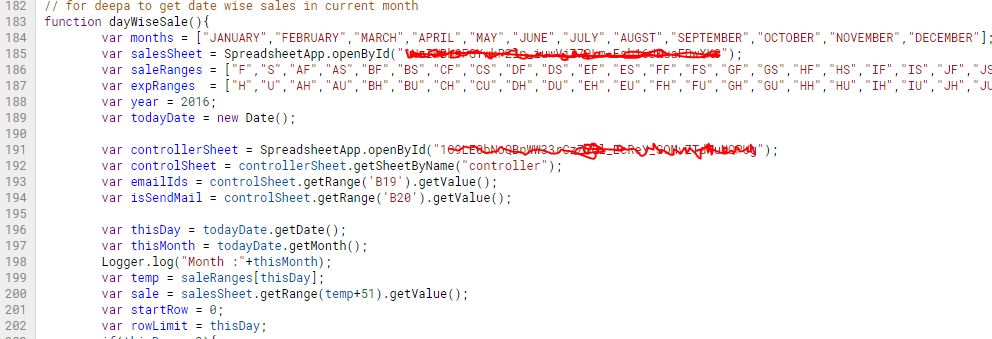
 Script : The source code behind the application. There is around 100  services running behind the application.
Source code : Scripts


 Execution Dashboard : Dashboard have the information like what all services run , execution time, and status
Execution Dashboard


 Triggers : like batch it works.The dashboard gives additional information like Error rate of application

Triggers

Thanks for reading this page.

Please drop all your queries to us

There were many occasion when we got criticism on our project during development cycle. The accounts section criticised the most. But eventually we reach our goal. Within 2 months we were able to stabilise our services. Our fault tolerance turns to value zero. So Never Quit from what your goal is....


Gift you dear ones !!!

Every occasion and every moments are precious in your life. Gift you dear ones to show how much you care for them. A small gift can bring a beautiful smile on your dear ones face. Hurry !!!


August 07, 2019

what is an intranet application and how it helps an organisation


Learn about consumerfed kozhikode region intranet


Years ago in 2014, we found missing something that is needed to our regional office, that the way the communication has to be made.

We search a lot, we researched all the software available in the market.

We tried build our own.

An the end result is this....


Thanks to Information Technology Consumerfed

Unwinding a matrix in java on dec 7 th 2019


June 14, 2019

Consumerfed intranet application developed for regional office kozhikode

Consumerfed intranet application developed for regional office kozhikode


Created an intranet for other sections operating inside kozhikode regional office.

* Helps to communicate with other employees effectively

* Helps to assign the task efficiently.

* Communication is easy now

* It cannot access from outside.

* Deployed on a dedicated server.


Just watch the video...

Feel free to comment...
v

May 28, 2019

Bat file that runs and identifies the system configuration- system tools


No Matter how hard things are, if time comes we can achieve it.

Old systems are always a head ache for Information Technologies Technicians who working at consumerfed. Replacing the right part by knowing the actual configuration is a nightmare for them.

Some computers are aged more than the employees there.

So Consumerfed Information Technology Section finds a solution for such issues, We have created a bat file that runs and identifies the system configuration and check the basic needs are working finely...

The sample code is given below, Just copy & paste to a notepad, save it as bat extension. run it.

Contact us on 8281808029 ( consfedkozhikode(at)gmail.com)


Diagnosis tool developed by kozhikode region Information Technology


MKDIR D:\ITDiagnosis
if not exist D:\ITDiagnosis\diagnosis.txt dir > D:\ITDiagnosis\diagnosis.txt
echo cfed tool run on %date% >> D:\ITDiagnosis\diagnosis.txt
wmic bios get serialnumber >> D:\ITDiagnosis\diagnosis.txt
wmic computersystem get model >> D:\ITDiagnosis\diagnosis.txt
echo checking units network issue >> D:\ITDiagnosis\diagnosis.txt
echo ===================== >> D:\ITDiagnosis\diagnosis.txt
net view >> D:\ITDiagnosis\diagnosis.txt

echo checking your internet >> D:\ITDiagnosis\diagnosis.txt
echo ================>> D:\ITDiagnosis\diagnosis.txt
ping www.google.co.in >> D:\ITDiagnosis\diagnosis.txt

echo checking ro ftp connection >> D:\ITDiagnosis\diagnosis.txt
echo ===================>> D:\ITDiagnosis\diagnosis.txt
ping 117.218.68.154 >> D:\ITDiagnosis\diagnosis.txt


echo ip address details >> D:\ITDiagnosis\diagnosis.txt
echo =============>> D:\ITDiagnosis\diagnosis.txt
ipconfig /all >> D:\ITDiagnosis\diagnosis.txt

getmac >> D:\ITDiagnosis\diagnosis.txt

echo Routing table >> D:\ITDiagnosis\diagnosis.txt
echo =========>> D:\ITDiagnosis\diagnosis.txt
route print >> D:\ITDiagnosis\diagnosis.txt


echo System Informations >> D:\ITDiagnosis\diagnosis.txt
echo ===============>> D:\ITDiagnosis\diagnosis.txt
systeminfo >> D:\ITDiagnosis\diagnosis.txt

echo User details >> D:\ITDiagnosis\diagnosis.txt
echo ===============>> D:\ITDiagnosis\diagnosis.txt
net user >> D:\ITDiagnosis\diagnosis.txt
wmic useraccount list brief >> D:\ITDiagnosis\diagnosis.txt

if not exist D:\ITDiagnosis\swlist.txt dir > D:\ITDiagnosis\swlist.txt
wmic product >> D:\ITDiagnosis\swlist.txt

echo The code is written by bithesh Consumerfed Information Technology SECTION, Regional Office Kozhikode >> D:\ITDiagnosis\diagnosis.txt


April 21, 2019

Consumerfed Kozhikode Regional Office Information Technology Attendance Monitoring System


Kozhikode regional office, Information Technology section stood different from other Regional office under consumerfed in implementing New Information Technology strategies.


Almost all new things like blocking internet in a region, tracking system using own build software, intranet etc has already implemented in this region.

The intranet system helps the employees in the regional office to communicate effectively.


Developed an attendance Tracking system, which can be accessed any where through a web browser.
Helped the triveni units under the region to mark their employee attendance.


I fight with many issues during development like firewall, networking etc etc. But within a short span of time, I able to achieve the goal,
A software with minimum bug ( almost zero).
and can be easily update, even for the person whom without an prior software knowledge.

The software was successfully commission to regional office on 2015 to then Regional Manager PK Abdul Gafoor

consumerfed dashboard
Email dashboard


The regional office is now able to track employee attendance in real time.
A report can be generated within 11 am daily.

Introducing attendance tracking system to Regional Office Kozhikode

Regional Office Kozhikode in 30 Minutes


Focus on the races you have won and how far you've come, At every stage, be both a mentor and a mentee

Please send your feedback to consfedkozhikode@gmail.com

Read More on consumerfed

April 07, 2019

Information technology Section Regional Office kozhikode Consumerfed


Consumerfed Regional Office Kozhikode


Kerala State Co-operative Consumers’ Federation Limited (Consumerfed) is the apex body of the consumer Co-operatives in the state of KeralaIndia. It was founded on 4 September 1965


Budget creating software developed for consumerfed kozhikode region price controlling officer


This is the way how we create budget for the next month using java software..


Dear freinds,

It has been five and a half years since the application is launched at consumerfed kozhikode region and successfully running in the region at 40 trivenis including mobile , godown, neethi medicasl sections and liquor shop.
The whole credit for developing the software goes to the IT section regional office ( Management trainees) But now consumerfed is planning to reduce the size of Management trainees

A great that to consumerfed I T section for their support and special thanks to bithesh consumerfed


The project was launched on March 2015 and last updated on September 2017. Report to mobiles are also available now. Backup s are automated

E mail report
footer
Tracking the sales , subsidy monitoring, tracking hardware details are other key features of the application. Reports in html , pdf formats are available, video tutorials are available in youtube channel.


You can contact us on 0091-8218808025

Join us at linkedin  follow us  Hangout group


Mobile phone cover - Buy one Hurry !!! 


കൺസ്യൂമർഫെഡ് സെയിൽസ് - അറ്റന്റൻസ് - സബ്സിഡി ഡാഷ്‌ബോർഡ്


കൺസ്യൂമർഫെഡ് ഡാഷ്ബോർഡ് - കൺസ്യൂമർഫെഡ് കോഴിക്കോട് റീജിയൺ വേണ്ടി നിർമിച്ച സെയിൽസ് അറ്റന്റൻസ് ഹാർഡ്‌വെയർ മൈന്റനെൻസ് അപ്ലിക്കേഷൻ ന്റെ റിപ്പോർട്ട് കാണുവാൻ സഹായിക്കുന്നു . സെയിൽസ് മോണിറ്ററിങ് സിസ്റ്റം ആണ് ഇത് ഒരു ഇൻവെന്ററി സോഫ്റ്റ്‌വെയർ എല്ലാ !


 ഈ ഡാഷ്‌ബോർഡ്  കണ്ട്രോൾ ചെയുന്നത് ഒരു സ്പ്രെഡ്ഷീറ്റ് ആണ്. ഇതിൽ b 13 ൻറെ വാല്യൂ SBDY  എന്നാക്കിയാൽ റിപ്പോർട്ട് മെയിൽ ഇൽ സബ്‌സിഡി റിപ്പോർട്ട് കൂടി കാണിക്കും .

ഈ റിപ്പോർട്ട് വഴി കോൺസുമെർഫെഡ് കോഴിക്കോട് റീജിയണൽ ഓഫീസിന് ത്രിവേണി യൂണിറ്റ് ഉകൾ മോണിറ്റർ ചെയുനതിൽ ഉപരി റീജിയണൽ മാനേജറിന് 11 മണിക്ക് തന്നെ കോൺസുമെർഫെഡ് കോഴിക്കോട് റീജിയണിന്റെ ഒരു ഔട്‍ലിനെ ഇ മെയിൽ ആയി ലഭിക്കും.

കൺസ്യൂമർഫെഡ് കോഴിക്കോട് റീജിയന്ന് വേണ്ടി നിർമിച്ച സെയിൽസ് അക്കൗണ്ട്സ് അറ്റന്റൻസ് ഹാർഡ്‌വെയർ സ്പ്രെഡ്ഷീറ്റ് എന്നിവയിലെ റിപ്പോർട്ട് ഒരുമിച്ച് കാണാൻ ഈ റിപ്പോർട്ട് സഹായിക്കുന്നു .

ഡാഷ്‌ബോർഡ് സബ്സ്ക്രൈബ് ചെയുവാനുള്ള ലിങ്ക് 

നിങ്ങൾക്ക് ദിവസവും 11 മണിക്ക് ഡാഷ്‌ബോർഡ് കാണാൻ സാധിക്കും .


കൺസ്യൂമർഫെഡ് ഡാഷ്‌ബോർഡ് കണ്ട്രോൾ പാനൽ 


To show computer details in dashboard എന്നത് നോ ആക്കിയാൽ കമ്പ്യൂട്ടർ ഡീറ്റെയിൽസ് റിപ്പോർട്ട് ഇ മൈലിൽ കാണിക്കില്ല


കൺസ്യൂമർഫെഡ് അറ്റന്റൻസ് അപ്പസ്‌ , സെയിൽസ് അപ്പസ്‌ സെർവർ ഡൌൺ അന്നെങ്കിൽ ഈ നോട്ടിഫിക്കേഷൻ ലഭിക്കും


നിങ്ങളുടെ അഭിപ്രായങ്ങൾ ചുവടെ  അറിയുക്കുക


Buy low price mobile cover from amazon

Your queries ????


Description

Created a loading and unloading template for Triveni Godown no 2 for godown incharge (+biju k). The apps was developed on march 2017. The application is deployed in consumerfed kozhikode regional office google drive. The same report can be viewed in regional office. The backup of application will be created 9th of month during midnight. The backup can be viewed by I T admin (+bithesh soubhagya) at regional office kozhikode. A pdf attached mail will be send weekly.

The particular has two options in the combo box " load and unload " and " advance payment ", choose the particular enter the advance paid, then enter the loading charge per day, balance will be automatically displayed on the top.

You can contact me at 8281808029

Screenshots


link to sheet


Please provide your comments/feedbacks

Thanks to Bithesh consumerfed


http://javabelazy.blogspot.in/

Online attendance tracking system consumerfed


Issues and solutions

Step 0 : Download the bat file here

Step 1 : check your internet connection

Step 2 : set Mozilla as your default browser


Open Mozilla firefox browser >> Go to tools (or Type Alt+T) >> click on Option >> click on Make default button

How it works - video


Consumerfed I T Section, Kozhikode


Developed for bithesh consumerfed

Online sales application for accounts section


Description


The application was initially developed for supporting the inventory system developed by I T section (head office). The project was assigned by Regional Manger through the I T, which then modified and new features are added as a requirement by pco kozhikode. The features like cash-credit report . subsidy monitoring, monthly sales, tranfer-in transfer out monitoring were include as per the requirement of accounts manager +deepa. The project was developed on may 2015 to validate sales details for Bee bee software developed by IT section consumerfed. The data were missing, double in the software at that time, so to analyse and solve the data issue the spreadsheet was very much helped them.

     This spreadsheet helps to validate the data in the software, help to fix the bugs related with data (includes sales, expense, r&d etc). Proper internet connection is mandatory to run the sheet. The spreadsheet will change daily so as to help the triveni units to enter their last day sales details, also the system automatically compute the reports needed for accounts section and email accounts manager. The branches under kozhikode region can also enter their monthly sales transaction / account details in the sheet.  The application automatically keep a backup in consfedkozhikode@gmail.com google drive folder named " Backup ". link to spreadsheet is given in the page.

To edit the template of the sales sheet use the controller sheet, I T admin can edit this. contact number : 8281808029

controller sheet

In addition to source code , my soul is also present in this project.  I worked so sincerely and honestly on this project. Each steps were challenging as there was an unsupported behavior from the regional manager as well as regional I T section once the project was deployed. They made me to stop running the project by defaming my work.

The below are the features in the apps.


Daily sales html report

Daily sales html report
sample download here


Daily sales pdf report


sample download here


Day wise subsidy report

Day wise subsidy report with packing charges details

For sending fund flow statement

Day wise cash credit sales

Monthly wages details

Wages details email
sample download here

Monthly expense, purchase, sales report


monthly expense, sales, purchase

sample download here

Messaging to unit

sending message to unit through google spreadsheet

Fast moving consumer goods to accounts section

FMCG report consumerfed

Online sales monitoring application

Online sales monitoring application

Daily sales google script code

Google script code for spreadsheet

Automatic Backup of spreadsheet

The application will automatically create a back up of the whole spreadsheet with monthly data entered by the user in office google drive folder named backup

Messaging to triveni units through spreadsheet

any one who can login to office mail can access the spreadsheet script editor, there by helps them to send message to triveni units, a pop up will show on the screen as shown in the screen shot

Admin can lock & unlock the spreadheet

Locking and unlocking the sheet prevents the user for entering the data, the task was initially assigned by Regional Manager


link to daily sales spreadsheet


Thanks to +deepajayaprakash payyanakkal

http://javabelazy.blogspot.in/
എന്താണ് ഈ അറ്റന്റൻസ് മോണിറ്ററിങ് സിസ്റ്റം 

കോഴിക്കോട് റീജിയണിന്റെ കീഴിൽ ഉള്ള ത്രിവേണി സൂപ്പർ മാർക്കറ്റ് , മൊബൈൽ ത്രിവേണി സ്റ്റോർ , ലിക്യുർ ഷോപ് , ഗോഡൗൺ , റീജിയണഅൽ  ഓഫീസ് എന്നിവിടങ്ങളിൽ നിന്നും മാർക്ക് ചെയുന്ന അറ്റന്റൻസ് , മാർക്ക് ചെയുന്ന സമയം തന്നെ റീജിയണൽ ഓഫീസിൽ കാണാനുള്ള സൗകര്യം ഒരുക്കുന്ന ഒരു അപ്ലിക്കേഷൻ , നിർമിച്ചത് കോഴിക്കോട് റീജിയണൽ ഓഫീസ് ഐ ടി വിഭാഗം.

ഇത് നിർമിച്ചത് 2015 ഇൽ അന്നത്തെ  റീജിയണൽ മാനേജർ  വേണ്ടി  . അന്ന് മുതലുള്ള ടാറ്റ സേവ് ചെയ്തു വെച്ചിട്ടുണ്ട് .

പിന്നിട് പുതിയ കൂറേ കാര്യങ്ങൾ കൂടി 2016 ഇൽ ഇതിൽ കൊണ്ടു വന്നു .

ഇത് എഡിറ്റ് ചെയ്യാനുള്ള പ്രിവിലിയേജ് റീജിയണൽ ഓഫീസിൽ ഐ ടി ഇൻചാർജ് ന് മാത്രമാണ് ഉള്ളത് എങ്കിലും റീജിയണൽ ഓഫീസ് ഇ മെയിൽ അക്കൗണ്ട്സ് ഉപയോഗിക്കുന്ന ആർക്കും ഇത് എഡിറ്റ് ചെയ്യാൻ സാധിക്കും . ഇത് നിർമിച്ചിരിക്കുന്നത് ആരീതിയിൽ അന്ന് .


എങ്ങനെയാണ് അറ്റന്റൻസ് മാർക്ക് ചെയുക 

ഈ ലിങ്കിൽ കാണുന്ന അറ്റന്റൻസ് ഫോം ഇൽ അറ്റന്റൻസ് മാർക്ക് ചെയ്യാനുള്ള സൗകര്യം ഉണ്ട് . ഈ ലിങ്ക് ഒരു ബാറ്റ് ഫയൽ അകത്തു ആഡ് ചെയ്‌ത്‌ കമ്പ്യൂട്ടർ ഡെസ്ക്ടോപ്പ് ഇൽ കോപ്പി ചെയുക . ബാറ്റ് ഫയൽ ഡബിൾ ക്ലിക്ക് ചെയുമ്പോൾ അറ്റന്റൻസ് ഫോം ഓപ്പൺ ആവും .

ലിങ്ക് വീഡിയോ


എങ്ങനെയാണ് മാർക്ക് ചെയ്ത  അറ്റന്റൻസ് കാണുക 

റീജിണൽ ഓഫീസിൽ ഒരു എക്സൽ ഷീറ്റ് ലിങ്ക് ഷെയർ ചെയ്‌തിട്ടുണ്ട് , അത് അതിന് വേണ്ടി നിർമിച്ചതാണ് , ഇതിന് പുറമെ ദിവസേന  അത് കണ്സോളിഡേറ് ചെയ്ട് റിപ്പോർട്ട് ഇമെയിൽ അയക്കും . പുറമേ റീജിയണൽ മാനേജറിന്റെ   മൊബൈലിൽ തൽസമയം റിപ്പോർട്ട് നോക്കുവാൻ സാധിക്കും .അക്കൗണ്ട്സ് മാനേജർ ക് മാസ സാലറി കണക്കുകൂട്ടാൻ സഹായിക്കുന്ന റിപ്പോർട് ഇമെയിൽ അയക്കും


എങ്ങിനെ പുതിയ പേരുകൾ,  ത്രിവേണി പേരുകൾ ഇതിൽ ചേർക്കും 

ഓഫീസ് ഇമെയിൽ യൂസ് ചെയുന്ന ആർക്കും ഇതിൽ പുതിയ പേര് ചേർക്കാൻ സാധിക്കും . ഇതിന് ഐ ടി പരിജ്ഞാനം ആവശ്യമില്ല .ഈ ഫോം അങ്ങേനെയാണ് നിർമിച്ചിരിക്കുന്നത് . ഒരു നാലാം ക്‌ളാസ് യോഗ്യത ഉള്ള വെക്തിക് ഇത് എഡിറ്റ് ചെയ്യാൻ സാധിക്കും .


എവിടെയാണ് ഈ സോഫ്റ്റ്‌വെയർ സേവ് ചെയ്തു വെച്ചിരിക്കുന്നത് 

ഓഫീസ് ഇമെയിൽ ഡ്രൈവിൽ അന്ന് ഈ സോഫ്റ്റ്‌വെയർ നിർമിച്ചിരിക്കുന്നത് , ഈ സോഫ്റ്റ്‌വെയർ എഡിറ്റ് ചെയുമ്പോൾ ഓഫീസിൽ ഇമെയിൽ സന്ദേശം വെറും 


ഡാറ്റ മിസ് ആവാൻ സാധ്യധ ഉണ്ടോ ?

ഇല്ല , എല്ലാ  മാസവും സോഫ്റ്റ്‌വെയർ ഓട്ടോമാറ്റിക് ആയി , ഓഫീസിന്റെ ഡ്രൈവിൽ ബാക്ക് അപ്പ് ഫയൽ ക്രെയ്റ്റ ചെയ്യും

ഇത്  ഇ മെയിൽ വഴി ഓഫീസ് നെ അറിയിക്കും  .


മറ്റ് പ്രത്യകത , തീരെ ചിലവില്ലാതെ രീതിയിൽ  ആനി ഇത് നിർമിച്ചിരിക്കുന്നത് . ഇതിന് മുൻപ് സെയ്ൽ എന്റർ ചെയുന്ന അപ്ലിക്കേഷൻ നിർമിച്ചിരുന്നു , അതും ഓഫീസ് ഡ്രൈവിൽ തന്നെയാണ് നിർമിച്ചത് , 

എപ്പോഴും അക്സസ്സ് ചെയ്യാൻ സാധിക്കുന്ന ഒരു സെർവറിൽ മാത്രമേ അപ്ലിക്കേഷൻ നിർമിക്കാൻ സാധിക്കുകയുള്ളു . ഒരു വ്യക്തിയുടെ കമ്പ്യൂട്ടർ ഇൽ  ഇത് നിർമിച്ചാൽ പബ്ലിക് ഇന് ഇത് അക്സസ്സ് ചെയ്യാൻ സാധിക്കില്ല . അങ്ങെനെ ആരെങ്കിലും വിചാരിച്ചിട്ടുണ്ടെങ്കിൽ അത് തിരുത്തുക

ഇത് ജാവ സ്ക്രിപ്റ്റ് ഉള്ള വെബ് ബ്രൗസറിൽ മാത്രമേ വർകാവുള്ളു (മോസില്ല ഫയർഫോക്സ് ).


പുതിയ ഇമെയിൽ നോട്ടിഫിക്കേഷൻസ് എങ്ങെനെ ആഡ് ചെയാം?

താഴെ കാണുന്ന ലിങ്ക് ഒരു എക്സൽ ഷീറ്റ് ഓപ്പൺ ആകും ,ഓഫീസ് ഇമെയിൽ ഉപയോഗിക്കുന്ന ആർക്കും ഈ എക്സൽ എഡിറ്റ് ചെയാവുന്നതാണ്. ഇതിൽ ലഭിക്കേണ്ട ആളുകളുടെ യൂസർ ഇമെയിൽ ചേർത്തിട്ടുണ്ട്. ഇമെയിൽ നോട്ടിഫിക്കേഷൻ വേണ്ട എങ്കിൽ നോ എന്ന് ചേഞ്ച് ചെയ്തു കൊടുക്കാവുന്നതാണ് .


ഈ സോഫ്റ്റ്‌വെയർ നിർമിക്കുമ്പോൾ തന്നെ , ഇത് സുതാര്യമായി എഡിറ്റ് ചെയ്യാവുന്ന രീതിയിൽ ആനി നിര്മിച്ചിരിക്കുന്നത് . കോഴിക്കോട് റീജിയണൽ ഐ ടി വിഭാഗം ഇതിന് വേണ്ടി പ്രയത്നിച്ചിരിക്കുന്നു .

കമ്പ്യൂട്ടർ പരിജ്ഞാനം കുറവുള്ള റീജിണൽ ഓഫീസ് സ്റ്റാഫ് ന് എഡിറ്റ് ചെയ്യാൻ സാധിക്കുന്ന രീതിയിൽ അന്ന് ഇത് നിർമിച്ചിരിക്കുന്നത് .

ഈ സോഫ്റ്റ്‌വെയർ വിജയിക്കണമെങ്കിൽ ത്രിവേണി യൂണിറ്റ് ഇന്റെയും റീജിയണൽ ഓഫീസിലെ മുഴുവൻ സ്റ്റാഫിന്റെ സഹകരണം ആവശ്യമാണ് . 


2015 ഏപ്രിൽ മാസത്തിൽ അന്ന് ഈ സോഫ്റ്റ്‌വെയർ നിർമിച്ചത് . അതിന് ശേഷം 2016 സെപ്റ്റംബറിൽ പുതിയ റീജിയൻ മാനേജർ ഇന്റെ നിർദേശ പ്രകാരം ഇതിൽ നല്ല കൂറേ മാറ്റങ്ങൾ കൊണ്ടുവരുകയും , റീജിയൻ മാനേജറിന്റെ നല്ല സപ്പോർട്ട് ഉള്ളത് കൊണ്ട് ഇത് നല്ല രീതിയിൽ പ്രവര്തിതിച്ച വന്നു . 2016 സെപ്റ്റംബറിൽ ഇതിൽ കണ്സോളിഡേറ് ചെയ്യാനുള്ള ഓപ്ഷൻ വന്നു . അതിന് ശേഷം സാലറി കണക്കുകൂട്ടാൻ സഹായിക്കുന്ന റിപ്പോർട്ട് ഇതിൽ ചേർത്തു . 2017 ജനവരി യിൽ ഇതിൽ സോഫ്റ്റ്‌വെയർ അപ്ഡേഷന് ഓട്ടോമാറ്റിക് ആക്കി . ഇമെയിൽ റിപ്പോർട്ട് എഡിറ്റ് ചെയ്യാനുള്ള ഓപ്ഷൻ ചേർത്തഉ . ഓട്ടോമാറ്റിക് ബാക് അപ്പ് റീജിയൻ ഓഫീസ് ഗൂഗിൾ ഡ്രൈവിൽ ഓട്ടോമാറ്റിക് ആയി സേവ് ചെയ്യാനുള്ള ഓപ്ഷൻ ഇതിൽ ചേര്ത്തു. ഈ സോഫ്റ്റ്‌വെയർ എഡിറ്റ് ചെയ്യാൻ കമ്പ്യൂട്ടർ പരിജ്ഞാനത്തിന്റെ ആവശ്യം  ഇല്ല .


ചിലവ് കുറഞ്ഞ രീതിയിൽ ഈ അപ്ലിക്കേഷൻ നിർമിക്കാൻ വേണ്ടി മാസങ്ങളോളം പരിശ്രമിച്ചിട്ടുണ്ട് .


ഇന്ന് അറ്റന്റൻസ് മാർക്ക് ചെയ്ത ത്രിവേണിയുടെ എണ്ണം : 29 

കോഴിക്കോട് റീജിയനിൽ ആകെ 205 എംപ്ലോയീസ് ഉണ്ട് 

ഈ സോഫ്റ്റ്‌വെയർ 144 എംപ്ലോയീസ് ഉപയോഗിച്ചു 

ഇന്ന് ഈ സോഫ്റ്റ്‌വെയർ ഇൽ 91 പേര് മാർക്ക് ചെയ്തു 

താഴെ മാർക്ക് ചെയ്ത ഡീറ്റെയിൽസ്  (78 - 8 - 2 - 2)


ഈ അപ്പ്ലിക്കേഷനെ നിയന്ദ്രിക്കുന്ന പ്രോപ്പർട്ടി ഫയൽ ലിങ്ക് 


consumerfed dashboard - daily email


ദിവസേന കോഴിക്കോട് റീജിയണിന്റെ കണ്സോളിഡേറ് ഇ മെയിൽ രാവിലെ 11 മണിക്ക് ഓഫീസ് മെയിൽ ചെയ്യും


എങ്ങേനെയാണ് ഇ മെയിൽ നോട്ടിഫിക്കേഷൻ നിർത്തുക

കൺസ്യൂമർഫെഡ് ത്രിവേണി കോഴിക്കോടിന് വേണ്ടി നിർമിച്ചിരിക്കുന്ന ഈ അപ്ലിക്കേഷൻ കൺട്രോൾ ചെയുന്നത് ഒരു കൺട്രോളർ എക്സൽ ഷീറ്റ് ഉപയോഗിച്ചാണ് 
. ഈ എക്സൽ ഷീറ്റിൽ അപ്ലിക്കേഷൻ പ്രോപ്പർട്ടി വാല്യൂ ഉണ്ടാകും , ഇമെയിൽ അയക്കണോ എന്നത് നോ ആക്കിയാൽ ഇത് നിർത്തലാക്കും .


കൂടുതൽ  വിവരണങ്ങൾക്ക് ഐ ടി സെക്ഷനുമായി ബന്ധപെടുക ( 8281808025 to 29)

നിങ്ങളുടെ നിർദേശങ്ങൾ താഴെ കമെന്റ് ബോക്സിൽ എഴുതാം. ഈ സോഫ്റ്റ്‌വെയർ ഇന്റെ കുറവുകളും അറിയിക്കാം


യൂട്യൂബ് ചാനൽ സബ്സ്ക്രൈബ് ചെയ്യാനുള്ള ലിങ്ക്  

email us at consfedkozhikode@gmail.com


Bithesh consumerfed

Office Management System Project Proposal


Facebook comments