Showing posts with label java networking. Show all posts

March 30, 2016

To get system details through a bat file

How to get all system details to text file

Last week i was informed by I T section kozhikode  +bithesh soubhagya  to develop a software to track the hardware and software details of old working system in kozhikode region to create a hardware register.


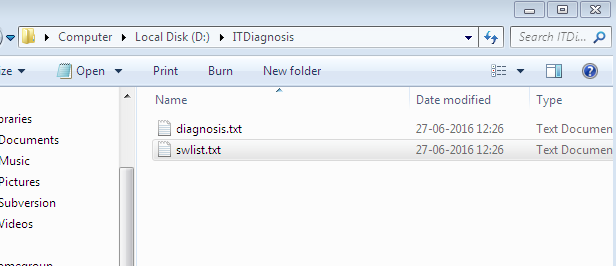
Here i am writing a code that can generate a text file with all needed system information. This can be used for diagnosis system issues. To find the serial number and model number of the system, the user details, the software details, medium access control address, ip configuration details, system information, routing table details, product details etc ... If you are looking for a tutorial about commands in operating system , just follow the link given below.

just copy and the paste the following code to a text file then save the file with an extension .bat

BAT FILE CREATION


MKDIR D:\ITDiagnosis
if not exist D:\ITDiagnosis\diagnosis.txt dir > D:\ITDiagnosis\diagnosis.txt
echo cfed tool run on %date% >> D:\ITDiagnosis\diagnosis.txt
wmic bios get serialnumber >> D:\ITDiagnosis\diagnosis.txt
wmic computersystem get model >> D:\ITDiagnosis\diagnosis.txt
echo checking units network issue >> D:\ITDiagnosis\diagnosis.txt
echo ===================== >> D:\ITDiagnosis\diagnosis.txt
net view >> D:\ITDiagnosis\diagnosis.txt

echo checking your internet >> D:\ITDiagnosis\diagnosis.txt
echo ================>> D:\ITDiagnosis\diagnosis.txt
ping www.google.co.in >> D:\ITDiagnosis\diagnosis.txt

echo checking ro ftp connection >> D:\ITDiagnosis\diagnosis.txt
echo ===================>> D:\ITDiagnosis\diagnosis.txt
ping 117.218.68.154 >> D:\ITDiagnosis\diagnosis.txt


echo ip address details >> D:\ITDiagnosis\diagnosis.txt
echo =============>> D:\ITDiagnosis\diagnosis.txt
ipconfig /all >> D:\ITDiagnosis\diagnosis.txt

getmac >> D:\ITDiagnosis\diagnosis.txt

echo Routing table >> D:\ITDiagnosis\diagnosis.txt
echo =========>> D:\ITDiagnosis\diagnosis.txt
route print >> D:\ITDiagnosis\diagnosis.txt


echo System Informations >> D:\ITDiagnosis\diagnosis.txt
echo ===============>> D:\ITDiagnosis\diagnosis.txt
systeminfo >> D:\ITDiagnosis\diagnosis.txt

echo User details >> D:\ITDiagnosis\diagnosis.txt
echo ===============>> D:\ITDiagnosis\diagnosis.txt
net user >> D:\ITDiagnosis\diagnosis.txt
wmic useraccount list brief >> D:\ITDiagnosis\diagnosis.txt

if not exist D:\ITDiagnosis\swlist.txt dir > D:\ITDiagnosis\swlist.txt
wmic product >> D:\ITDiagnosis\swlist.txt

echo The code is written by belazy.blogspot.in   >> D:\ITDiagnosis\diagnosis.txt
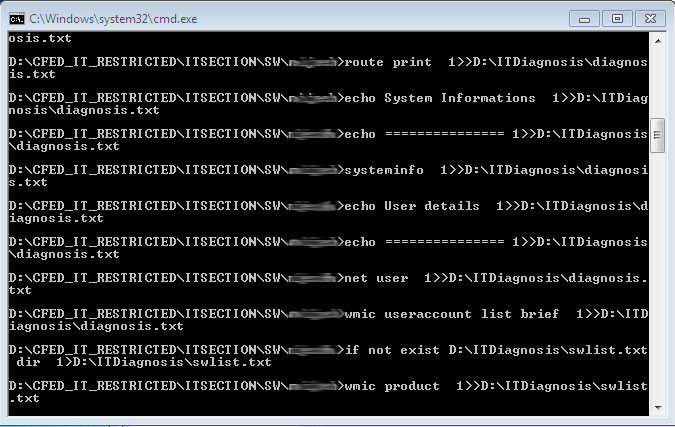

writing to a file


How to create a bat file ?

you can follow this link

windows commands

Similar posts

compare two strings using command prompt


Thanks to +Shimjith Kumar

Author : +belazy


The application is developed for consumerfed kozhikode region (for  +bithesh soubhagya )


http://javabelazy.blogspot.in/

March 22, 2016

How to get the list of users in network using java

How to get the list of computer users in the network


//List of users in the network

import java.io.*;

public class NetworkUsers
    {
static String all;
     public static void main(String[] args)
         {try {
        // Execute command
       
        Process child = Runtime.getRuntime().exec("net view");
        // Get the input stream and read from it
        InputStream in = child.getInputStream();
        int c;
        while ((c = in.read()) != -1)
        {
        char e=(char)c;
        System.out.println(e);
        //process((char)c);
        }
        in.close();
        } catch (IOException e) { }     }

private static void process(char c) {
// TODO Auto-generated method stub
System.out.print(c);
   //all  =String.valueOf(c) +all;
  // System.out.println(all);
}


         }

Program explanation

Inputstream implies that the program is getting input as a stream of bytes

Similar posts


How to get system details through a bat file


http://javabelazy.blogspot.in/

October 19, 2014

Sending File from System to System in java

How to send a file from one system to another using java code

Description :The program will help you to send a file from one computer to another in network through a socket. the port number here used is 8025 (we eliminate all 1024 reserved ports, for example 21 are reserved port for ftp).  developer can declare the port number as static final. The server application will send a file specified by the user through socket where the client application receives it. please provide feedback after running the code, check the java source code.This is an example for java networking application.


CLIENT SERVER
SENDING IMAGE FROM CLIENT TO SERVER IN JAVA


FTPServer.java

/**
 *
 */
package pakistan;

import java.io.DataInputStream;
import java.io.DataOutputStream;
import java.io.File;
import java.io.FileInputStream;
import java.io.IOException;
import java.io.OutputStream;
import java.net.ServerSocket;
import java.net.Socket;

/**
 * @author javabelazy
 *
 */
public class FTPServer {
  
    ServerSocket serverSocket = null;
    Socket socket = null;
    int data = -1;
    DataOutputStream dataOutputStream = null;
    OutputStream outputStreams = null;
    DataInputStream dataInputStream = new DataInputStream(System.in);
    String fileNameNew = null;
    String string = null;
    File file = null;
    FileInputStream fileInputStream = null;
  

    /**
     * @param args
     */
    public static void main(String[] args) {
        // TODO Auto-generated method stub
        FTPServer ftpServer = new FTPServer();
        ftpServer.sendFile();

    }

    private void sendFile() {
        // TODO Auto-generated method stub
        string = new String();
        try{
            //d = new DataInputStream(System.in);
            System.out.println(" Enter the file name to be transfered ");
            fileNameNew=dataInputStream.readLine();
            file = new File(fileNameNew);
            fileInputStream = new FileInputStream(file);
            serverSocket= new ServerSocket(8025);
            socket=serverSocket.accept();
            outputStreams=socket.getOutputStream();
            dataOutputStream=new DataOutputStream(outputStreams);
            while((data=fileInputStream.read())!=-1){
                char c = (char)data;
                string=string+c;
            }
            dataOutputStream.writeUTF(string);
            System.out.println("The file "+fileNameNew +" file transfered to client machine");

        }
        catch (Exception e) {
            // TODO: handle exception
            System.out.println(" The server system got an exception : "+e.getMessage());
        }
        finally{
            try {
                socket.close();
                serverSocket.close();
                outputStreams.close();
            } catch (IOException e) {
                // TODO Auto-generated catch block
                System.out.println(" Unable to send file (file transfer got the following exception ) : "+e.getMessage());
                e.printStackTrace();
            }

          
        }
      
    }

}


FTPClient.java

/**
 *
 */
package china;

import java.io.DataInputStream;
import java.io.File;
import java.io.FileOutputStream;
import java.io.IOException;
import java.io.InputStream;
import java.net.Socket;

/**
 * @author java belazy
 *
 */
public class FTPClient {
  
    Socket socket =  null;
    int len = 0;
    int count = 0;
    InputStream inputStream = null;
    DataInputStream dataInputStream = null;
    DataInputStream newDataInputStream = null;
    String fileName = null;
    String fileData = null;

    /**
     * @param args
     */
    public static void main(String[] args) {
        // TODO Auto-generated method stub
        FTPClient ftpClient = new FTPClient();
        ftpClient.receiveFile();

    }

    private void receiveFile() {
        // receiving file sent by host system
        while(true){
        try{
            socket=new Socket("", 8025);
            inputStream = socket.getInputStream();
            newDataInputStream=new DataInputStream(inputStream);
            System.out.println(" Enter the file name to be saved ");
            dataInputStream = new DataInputStream(System.in);
            fileName = dataInputStream.readLine();
            File file = new File(fileName);
            FileOutputStream fileOutputStream = new FileOutputStream(file);
            fileData =newDataInputStream.readUTF();
            len= fileData.length();
            for(count=0;count<len;count++){
                char c =fileData.charAt(count);
                fileOutputStream.write(c);
            }
            System.out.println("File copied to system ");

                   
        }catch (Exception e) {
            // TODO: handle exception
            System.out.println(" The file tranfer client got an exception : "+e.getMessage());
        }finally{
            try {
                socket.close();
                inputStream.close();
            } catch (IOException e) {
                // TODO Auto-generated catch block
                System.out.println(" The file tranfer client got an exception : "+e.getMessage());
                e.printStackTrace();
            }
           
           
        }
       
        }
       
    }

}
 

file transfer protocol implementation in java

October 04, 2013

Java code to get screen shot

How to get screen shot in java


 /**
 * @author Jim Brown
 *
 */

import java.awt.AWTException;
import java.awt.Dimension;
import java.awt.Rectangle;
import java.awt.Robot;
import java.awt.Toolkit;
import java.awt.image.BufferedImage;
import java.io.File;
import java.io.IOException;
import javax.imageio.ImageIO;
public class ScreenShotCapture {
   
    private static final String DIR_NAME = "SouthPark";

    public static void main(String[] shutdown)  {
        ScreenShotCapture captureSS = new ScreenShotCapture();
        captureSS.createDirectory(DIR_NAME);
        try {
            captureSS.getScreen();
        } catch (AWTException e) {
            // TODO Auto-generated catch block
            e.printStackTrace();
        } catch (IOException e) {
            // TODO Auto-generated catch block
            e.printStackTrace();
        }
    }

    private void createDirectory(String dirName) {
        File newDir = new File("D:\\"+dirName);
        if(!newDir.exists()){
            boolean isCreated = newDir.mkdir();
        }
}

    private void getScreen()throws AWTException, IOException {
        Toolkit toolkit = Toolkit.getDefaultToolkit();
        Dimension dimensions = toolkit.getScreenSize();
        Robot robot = new Robot();  // Robot class
        BufferedImage screenshot = robot.createScreenCapture(new Rectangle(dimensions));
        ImageIO.write(screenshot, "png", new File("D:\\"+DIR_NAME+"\\Gravity.png"));
   
   }
}

Hi Friends,

         This is a small program named Xkeycode  that enables you to capture system screen. Once you run the code it will capture the screen and save  and png image in your system. so please try it out..


October 23, 2012

Java client server socket program example

Java networking program to get client ip address in server.


Description : The client tries to establish a connection to server having ip address 127.0.0.1 through port 6363. The socket class is used to establish connection . The server always listen to port 6363 for request from the clients. Once a request reach the server through that port, it establish a connection with that particular client. Multiple clients can connect to server, since i used thread in server.

March 17, 2012

Audio chatting example in java

Audio chatting example in java

The program show a small demonstration of how Audio chat works in java. Click on the link to get the code. Two or more user can audio chat with the application. The program is developed using networking and java packages.
 

Program


Please try audio chatting program... dont forget to post your feed back.

did you ever tried two way chatting using java code. Here we use socket communication, thread for this program. click the below link to download the code. javablzy

Thanking you....


you can mail me to belazy1987atgmaildotcom.

February 01, 2012

Network monitoring in java to get all computer names in the network


Java Network Monitoring : To get all intra networked computer list


//Java network program to list out all available computers in intranet

import java.io.*;

public class NetworkUsers
{
static String all;
public static void main(String[] args)
{try {
// Execute command

Process child = Runtime.getRuntime().exec("net view");
// Get the input stream and read from it
InputStream in = child.getInputStream();
int c;
while ((c = in.read()) != -1)
{
char e=(char)c;
System.out.println(e);
//process((char)c);
}
in.close();
} catch (IOException e) { } }

private static void process(char c) {
// TODO Auto-generated method stub
System.out.print(c);
//all =String.valueOf(c) +all;
// System.out.println(all);
}


}


 Please provide your valuable comments

Facebook comments